Kubernetes uses role-based access control (RBAC) to decide who can perform which actions and on which API resources in a Kubernetes cluster. This concept is especially important in production environments, where broad rules can cause privilege issues and expose secrets.
This guide explains how Kubernetes RBAC works through examples.
Prerequisites
- kubectl and Kubernetes installed.
- (optional) phoenixNAP Bare Metal Cloud account for the Rancher/BMC sections.
What Is Kubernetes RBAC?
Kubernetes RBAC is an authorization method that controls access to the Kubernetes API. The method implements user roles, groups, and ServiceAccounts. Administrators define policies through the Kubernetes API like any other object (rbac.authorization.k8s.io).
The sections below describe where RBAC resides in the Kubernetes architecture and how it processes a request.
Role of Authorization in Kubernetes Architecture
Kubernetes uses a layered security model to evaluate every request. The API checks a request's permission through authorization before applying any additional admission controls.
Every kube-apiserver request passes through the following three steps:
- Authentication. Identifies who is making the request. Analyzes client certificates, OIDC tokens, or ServiceAccount tokens.
- Authorization. Decides if the provided identity can perform the requested action.
- Admission control. Validates or adjusts the request that passed authorization.
RBAC is one of several authorization modes. The Node authorizer handles API requests from kubelets, while RBAC covers most other users and workloads. If multiple authorizers are enabled, the API server checks them in order. The first authorizer to return an allow or deny decision determines the request's outcome. The request is denied if all authorizers return no opinion.
Enable RBAC alongside the Node authorizer by starting the API server with:
kube-apiserver --authorization-mode=Node,RBACThe flag lists authorizers in evaluation order. Alternatively, use the --authorization-config flag and provide a file that includes the RBAC authorizer. Most Rancher-provisioned and kubeadm clusters have RBAC enabled.
Note: RBAC controls access to the Kubernetes API. It does not control SSH access, pod traffic, or container privileges.
How RBAC Authorization Works (Subject vs. Resource vs. Verb)
Every RBAC decision answers a question in the following format:
Can [subject] perform [verb] on [resource]?
A request passes only if a rule matching its API group, resource, and verb is connected to the provided subject. Rules are purely additive. There are no deny rules; Kubernetes denies everything else by default.
The table below shows how a request maps to RBAC elements:
| Question | Element | Example |
|---|---|---|
| Who is making the request? | Subject | User alice |
| What action is requested? | Verb | list |
| Which object type is being accessed? | Resource | pods |
| Where is the resource located? | Namespace | dev |
The table assumes kubectl get pods --namespace dev sends a list request for the pods resource in the dev namespace. The request is authorized only if a RoleBinding or ClusterRoleBinding grants alice (or a group she belongs to) a role with a rule that permits the list verb on pods in the dev namespace.
Kubernetes RBAC Core Concepts
RBAC uses four API objects:
- Role. Holds permissions for namespaced resources within a specific namespace.
- ClusterRole. Defines permissions for cluster-scoped resources, namespaced resources, or non-resource URLs.
- RoleBinding. Attaches a Role or ClusterRole to subjects within a specific namespace.
- ClusterRoleBinding. Grants ClusterRole to subjects across the cluster.
The sections below describe each concept, starting with identities that receive permissions.
Subjects (Users, Groups, and ServiceAccounts)
A subject is an identity that receives a role. RBAC supports three kinds of subjects:
- User. A human or an external identity. Kubernetes doesn't have a User object, so it pulls the name from the authenticator (for example, a certificate common name or OIDC claim).
- Group. A set of users. Groups also come from the authenticator, such as a certificate organization field or an OIDC groups claim.
- ServiceAccount. A non-human identity represented by a namespaced Kubernetes API object. Commonly used by workloads and automation processes.
For example, a subjects: file fragment can list all three subjects:
subjects:
- kind: User
  name: alice
  apiGroup: rbac.authorization.k8s.io
- kind: Group
  name: developers
  apiGroup: rbac.authorization.k8s.io
- kind: ServiceAccount
  name: ci
  namespace: dev
Subject names are case-sensitive. A ServiceAccount named ci in the dev namespace authenticates as system:serviceaccount:dev:ci and belongs to two groups:
system:serviceaccounts.system:serviceaccounts:dev.
To create a namespace, run:
kubectl create namespace [namespace]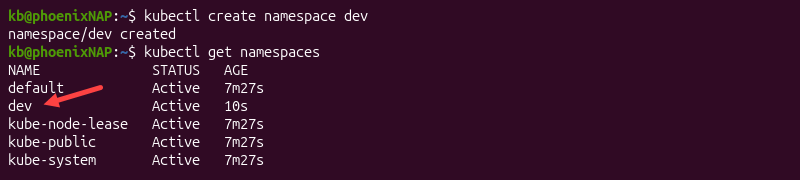
Create a ServiceAccount with:
kubectl create serviceaccount [name] --namespace [namespace]
Kubernetes also creates a default ServiceAccount in every namespace, typically used by pods that don't specify a ServiceAccount.
API Resources and Subresources
An API resource is an object type, such as Kubernetes pods or secrets. These objects have an API group and a plural name. Objects in the core group use an empty string for the group name, while others use a named group.
List the API resources in a cluster with:
kubectl api-resources --namespaced=true -o wide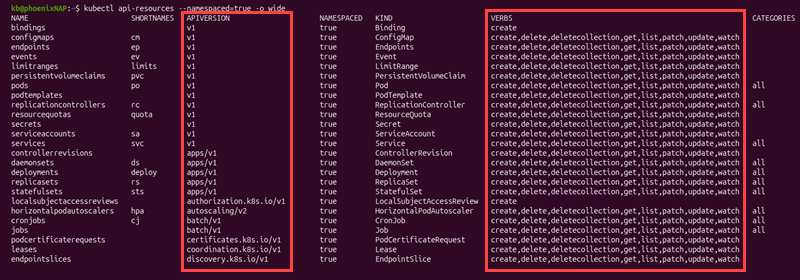
The APIVERSION column shows the API group and version, while the VERBS column shows which verbs each resource supports.
A subresource is a separate endpoint attached to a resource. It is written as [resources]/[subresource] and common examples include:
pods/logpods/execdeployments/scalenodes/proxy
If a subject has permission on a resource, it does not automatically extend to that resource's subresources. For example, a rule that lists pods does not automatically allow reading logs unless it includes a pods/log permission.
To limit a rule to specific objects, use resourceNames like in the example below:
rules:
- apiGroups: [""]
  resources: ["configmaps"]
  resourceNames: ["app-config"]
  verbs: ["get", "update"]
API Verbs
API verbs describe a request's action. Each API request maps to one verb. The table below describes the verbs, requests, and the actions they perform:
| Verb | HTTP request | Action |
|---|---|---|
get | GET (single object) | Reads one object. |
list | GET (collection) | Reads every object of a type and full contents. |
watch | GET (watch parameter) | Stream changes to objects. |
create | POST | Creates an object. |
update | PUT | Replaces an object. |
patch | PATCH | Modifies part of an object. |
delete | DELETE (single object) | Deletes one object. |
deletecollection | DELETE (collection) | Deletes many objects at once. |
Three additional special verbs control how RBAC behaves:
escalate. Allows a user to create or change a Role or ClusterRole with permissions they do not have themselves.bind. Enables a user to create or modify a RoleBinding or ClusterRoleBinding that grants a role they are not authorized to grant.impersonate. Allows a user to act as another user, group, or ServiceAccount when sending API requests.
A special case is the wildcard *. It matches every verb, including standard API verbs and special RBAC verbs.
Note: list returns the contents of the resources included in the response. watch can expose resource contents in watch events. When used on Secrets, these permissions can expose secret data. Learn more about Kubernetes security best practices.
Roles and ClusterRoles
Roles and ClusterRoles both control permissions, but are scoped differently:
- Role. Contains permission rules for a namespace.
- ClusterRole. Defines permissions on cluster-scoped resources (nodes, non-resource endpoints, namespaced resources on all namespaces). It is not tied to a single namespace.
The example below creates a namespaced Role and a cluster-wide ClusterRole:
apiVersion: rbac.authorization.k8s.io/v1
kind: Role
metadata:
  namespace: dev
  name: pod-reader
rules:
- apiGroups: [""]
  resources: ["pods", "pods/log"]
  verbs: ["get", "list", "watch"]
---
apiVersion: rbac.authorization.k8s.io/v1
kind: ClusterRole
metadata:
  name: node-reader
rules:
- apiGroups: [""]
  resources: ["nodes"]
  verbs: ["get", "list", "watch"]
The pod-reader role allows reading pods and their logs in the dev namespace. The node-reader ClusterRole allows reading nodes, which are cluster-scoped.
Kubernetes has four user-facing ClusterRole objects:
cluster-admin. Provides unrestricted access to all resources.admin. Grants read/write access to most namespaced resources, including Roles and RoleBindings. It cannot modify resource quotas or the namespace.edit. Provides read/write access to most namespaced resources, but not Roles or RoleBindings. Users who can create or modify workloads can access additional resources indirectly, such as Secrets available to ServiceAccounts they can use.view. Grants read-only access to most namespaced resources. It does not allow reading Secrets or modifying RBAC objects.
Note: Do not manually edit roles with the system: prefix. Kubernetes automatically reconciles default system roles and bindings to restore missing permissions or subjects.
RoleBindings and ClusterRoleBindings
A binding grants role permissions to one or more subjects:
RoleBinding. Grants the referenced role to the listed subject within the RoleBinding's namespace.ClusterRoleBinding. Grants the referenced ClusterRole to the listed subjects cluster-wide.
For example, grant pod-reader to the user alice in dev, and node-reader to the group alpha-team cluster-wide:
apiVersion: rbac.authorization.k8s.io/v1
kind: RoleBinding
metadata:
  name: read-pods
  namespace: dev
subjects:
- kind: User
  name: alice
  apiGroup: rbac.authorization.k8s.io
roleRef:
  kind: Role
  name: pod-reader
  apiGroup: rbac.authorization.k8s.io
---
apiVersion: rbac.authorization.k8s.io/v1
kind: ClusterRoleBinding
metadata:
  name: read-nodes
subjects:
- kind: Group
  name: alpha-team
  apiGroup: rbac.authorization.k8s.io
roleRef:
  kind: ClusterRole
  name: node-reader
  apiGroup: rbac.authorization.k8s.io
The roleRef field contains the role that is being granted. It is immutable, so changing which Role or ClusterRole a binding references requires deleting and recreating the binding. Changes to the referenced role itself do not require recreating the binding.
The equivalent for the first binding is:
kubectl create rolebinding read-pods --role=pod-reader --user=alice --namespace=devVerify the result through impersonation. Check if the user can list pods:
kubectl auth can-i list pods --namespace dev --as aliceNow check if the user can delete pods:
kubectl auth can-i delete pods --namespace dev --as alice
The first command shows yes, while the second returns no. Use these checks as a user allowed to impersonate, such as a cluster administrator.
Kubernetes RBAC Scope & Types
Permissions and scopes depend on the role type and the binding type. Together, they produce access patterns common in most clusters. The table below shows these combinations and the resulting scope:
| Role type | Binding | Scope |
|---|---|---|
| Role | RoleBinding | One namespace. The namespace of the role and binding. |
| ClusterRole | RoleBinding | One namespace. The namespace of the binding. |
| ClusterRole | ClusterRoleBinding | Every namespace, cluster-scoped resources, and non-resource URLs. |
A ClusterRoleBinding can only reference a ClusterRole. The sections below apply these combinations and demonstrate common use cases.
Namespaced Developer Scopes
Developers manage workloads in their own namespace. Anything beyond that scope is redundant. For such cases, use a namespaced Role bound with a RoleBinding.
For example, allow the developers group to manage dev Deployments and read objects around them:
apiVersion: rbac.authorization.k8s.io/v1
kind: Role
metadata:
  namespace: dev
  name: app-developer
rules:
- apiGroups: [""]
  resources: ["pods", "pods/log", "services", "configmaps"]
  verbs: ["get", "list", "watch"]
- apiGroups: ["apps"]
  resources: ["deployments", "deployments/scale"]
  verbs: ["get", "list", "watch", "create", "update", "patch", "delete"]
---
apiVersion: rbac.authorization.k8s.io/v1
kind: RoleBinding
metadata:
  name: app-developer-binding
  namespace: dev
subjects:
- kind: Group
  name: developers
  apiGroup: rbac.authorization.k8s.io
roleRef:
  kind: Role
  name: app-developer
  apiGroup: rbac.authorization.k8s.io
The role includes deployments/scale because kubectl scale uses that subresource. It grants no access to Secrets or RBAC objects, and the RoleBinding limits these permissions to the dev namespace.
To skip writing a custom role, bind the built-in edit or view ClusterRole with RoleBinding instead. The permissions apply inside the binding's namespace.
Note: Permission to create a Deployment is also permission to run any pod specification inside the Deployment. RBAC does not look at the pod template, so implement limits on privileged containers.
Cluster-Wide Administrative Scopes
Administrative-based roles require permissions outside of a namespace, such as inspecting storage, nodes, or namespaces. These roles require a ClusterRole bound with a ClusterRoleBinding.
For example, give read-only visibility into cluster-level objects to the platform-auditors group:
apiVersion: rbac.authorization.k8s.io/v1
kind: ClusterRole
metadata:
  name: cluster-auditor
rules:
- apiGroups: [""]
  resources: ["nodes", "namespaces", "persistentvolumes"]
  verbs: ["get", "list", "watch"]
---
apiVersion: rbac.authorization.k8s.io/v1
kind: ClusterRoleBinding
metadata:
  name: cluster-auditor-binding
subjects:
- kind: Group
  name: platform-auditors
  apiGroup: rbac.authorization.k8s.io
roleRef:
  kind: ClusterRole
  name: cluster-auditor
  apiGroup: rbac.authorization.k8s.io
The role can read cluster-scoped objects but cannot change anything or read Secrets.
Note: Reserve cluster-wide administrative roles for a small number of platform admins.
ServiceAccount Access Scopes
Workloads and pipelines that send requests to the Kubernetes API should use a dedicated ServiceAccount. It should have only the required permissions for the task. Use a RoleBinding in the target namespace to grant a ServiceAccount from another namespace access to resources there.
For example, allow the ci-deployer ServiceAccount from the ci namespace to update Deployments in dev:
apiVersion: v1
kind: ServiceAccount
metadata:
  name: ci-deployer
  namespace: ci
---
apiVersion: rbac.authorization.k8s.io/v1
kind: Role
metadata:
  namespace: dev
  name: deployment-updater
rules:
- apiGroups: ["apps"]
  resources: ["deployments"]
  verbs: ["get", "list", "watch", "update", "patch"]
---
apiVersion: rbac.authorization.k8s.io/v1
kind: RoleBinding
metadata:
  name: ci-deployer-updates
  namespace: dev
subjects:
- kind: ServiceAccount
  name: ci-deployer
  namespace: ci
roleRef:
  kind: Role
  name: deployment-updater
  apiGroup: rbac.authorization.k8s.io
The ServiceAccount allows updating existing Deployments in dev, but it cannot create or delete any. Generate a short-lived token for an external pipeline:
kubectl create token ci-deployer --namespace ci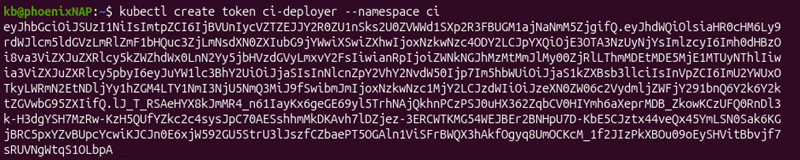
Avoid binding roles to the system:serviceaccounts:[namespace] group. It grants permission to every ServiceAccount in that namespace.
Note: Reserve cluster-wide administrative roles for a small number of platform admins.
Avoid binding roles to the system:serviceaccounts:[namespace] group. It grants permission to every ServiceAccount in that namespace.
Non-Resource API Scopes
Some API endpoints are not Kubernetes objects. For these endpoints, use nonResourceURLs instead of resources. They are valid only in a ClusterRole, and they take effect when bound with a ClusterRoleBinding.
For example, allow a Prometheus ServiceAccount to scrape the /metrics endpoint:
apiVersion: rbac.authorization.k8s.io/v1
kind: ClusterRole
metadata:
  name: node-metrics-reader
rules:
- nonResourceURLs: ["/metrics"]
  verbs: ["get"]
---
apiVersion: rbac.authorization.k8s.io/v1
kind: ClusterRoleBinding
metadata:
  name: prometheus-metrics-reader
subjects:
- kind: ServiceAccount
  name: prometheus
  namespace: monitoring
roleRef:
  kind: ClusterRole
  name: node-metrics-reader
  apiGroup: rbac.authorization.k8s.io
For non-resource URLs, use a trailing wildcard (*) as a suffix glob match, for example /monitoring/*. Default roles give authenticated users access to basic discovery, health, and version endpoints. A custom rule is only required for endpoints beyond those.
Custom Resource Definition (CRD) Scopes
A CustomResourceDefinition (CRD) adds a new API group and resource type to a cluster. RBAC treats this custom resource like built-in ones:
apiGroups. Specifies the CRD's API group.resources. Defines its plural resource name.
List resources in a group with:
kubectl api-resources --api-group=example.comLabel a ClusterRole for aggregation so the built-in view role can read custom resources. For example:
apiVersion: rbac.authorization.k8s.io/v1
kind: ClusterRole
metadata:
  name: deployment-viewer
  labels:
    rbac.authorization.k8s.io/aggregate-to-view: "true"
rules:
- apiGroups: ["example.com"]
  resources: ["widgets"]
  verbs: ["get", "list", "watch"]
The aggregate-to-view label merges the rules into view. The same pattern works with aggregate-to-edit and aggregate-to-admin. Subresources require their own entries.
Treat write access to custom resources as a separate privilege, and scope it based on whether the custom resource is namespaced or cluster-scoped.
phoenixNAP BMC Integration and Infrastructure Access Controls
Kubernetes RBAC safeguards access to the Kubernetes API. A Kubernetes cluster running on Bare Metal Cloud (BMC) operates on dedicated physical infrastructure provisoned through code (IaC) with its own management and access controls.
The two layers use separate authorization mechanisms. BMC controls infrastructure resources, such as servers and networks. Kubernetes RBAC controls access to Kubernetes API resources.
The sections below define the exact boundary between BMC access and Kubernetes RBAC, and how Rancher and node-level permissions fit into it.
Bare Metal Infrastructure Isolation vs. API Authorization Boundaries
BMC servers are single-tenant, dedicated machines with no pre-installed hypervisor. Kubernetes authorization operates on a separate layer: it determines which users, groups, and ServiceAccounts can perform actions on Kubernetes API resources.
The table below outlines the main differences:
| Aspect | BMC Access | Kubernetes RBAC |
|---|---|---|
| Controls | Server, network, and IP block lifecycle through the BMC portal and API. | Access to objects in the Kubernetes API. |
| Credentials | Portal login and API credentials (client ID and secret) with selected permission scope. | Client certificates, OIDC tokens, and ServiceAccount tokens. |
| Managed through | BMC portal, API, IaC tools. | Role and binding manifests. |
| Audit | BMC Audit logs API. | Kubernetes API server audit logs. |
BMC API credentials that can provision or manage servers grant no access to Kubernetes API resources, such as Secrets. Likewise, Kubernetes RBAC permissions grant no access to the BMC API. Each requires separate credentials and audits.
SUSE Rancher Integration
BMC offers Rancher Server deployment, which provisions a non-virtualized BMC server with SUSE Rancher pre-installed. Deployment is a simple three-step process in the BMC portal:
- Create a cluster.
- Add a node.
- Adjust node settings, including SSH keys.
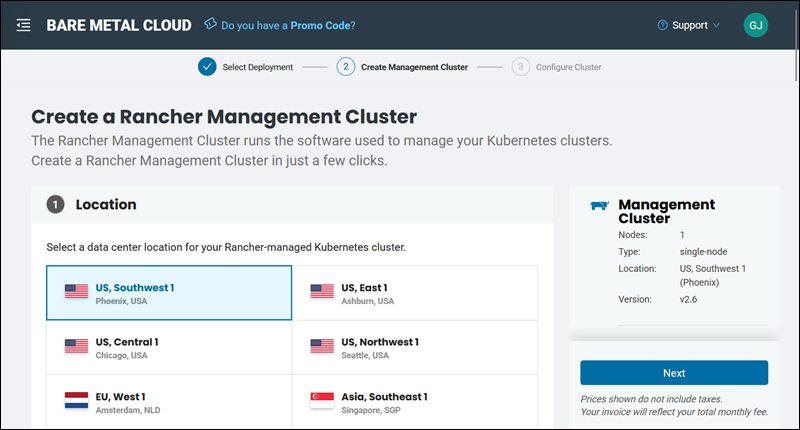
Rancher adds its own access layer on top of Kubernetes RBAC. It stores global roles and role templates as Rancher resources and uses them to generate the underlying Kubernetes Role, ClusterRole, and binding objects.
The table below summarizes the scope and role types at each level:
| Level | Scope | Built-in roles | Binding object |
|---|---|---|---|
| Global | Entire Rancher installation. | Administrator, Standard User, User-Base. | GlobalRoleBinding |
| Cluster | One managed cluster. | Cluster Owner, Cluster Member, and custom cluster roles. | ClusterRoleTemplateBinding |
| Project | One project, a group of namespaces | Project Owner, Project Member, Read Only, and custom project roles | ProjectRoleTemplateBinding |
The Project Member role inherits from the Kubernetes edit role, while Project Owner inherits from admin. A custom role can inherit from another role instead of being built from scratch.
For example, bind a group to a cluster role through Rancher's own object instead of a raw Kubernetes binding:
apiVersion: management.cattle.io/v3
kind: ClusterRoleTemplateBinding
metadata:
  name: platform-team-cluster-owner
  namespace: [cluster_id]
clusterName: [cluster_id]
groupPrincipalName: [external_group_id]
roleTemplateName: cluster-owner
For example, a practical pattern for role assignment is:
- Platform engineers. Cluster roles, bound through the cluster's membership settings.
- Developers. Project roles, scoped to the projects that hold their namespaces.
- Auditors. The Read Only role, or a custom role with read-only rules.
Assign roles to groups from an authentication provider instead of individual users. Manage access through Rancher's UI instead of editing the generated Kubernetes bindings by hand.
Note: To deploy a Rancher cluster on Bare Metal Cloud, see our setup guides:
Securing Bare Metal Ingress, Storage, and Node Subresources
Three permission areas require special attention on a bare metal cluster:
- Ingress. Permission to publish services outside the cluster.
- Storage. Permission to create volumes and hold storage credentials.
- Node subresources. Permission to reach the kubelet through the API server.
Ingress
IngressClass is a cluster-scoped resource separate from Ingress objects that reference it. Provide application teams control over Ingress and Service objects in their namespace:
apiVersion: rbac.authorization.k8s.io/v1
kind: Role
metadata:
  namespace: dev
  name: ingress-editor
rules:
- apiGroups: ["networking.k8s.io"]
  resources: ["ingresses"]
  verbs: ["get", "list", "watch", "create", "update", "patch", "delete"]
- apiGroups: [""]
  resources: ["services"]
  verbs: ["get", "list", "watch", "create", "update", "patch", "delete"]
Do not give control over ingressclasses since it selects which controller handles cluster-wide traffic.
Storage
PersistentVolume objects are cluster-scoped. Some PersistentVolume configurations can expose storage on a node or reference sensitive node-level paths. Avoid permitting developers to create PersistentVolume objects unless necessary. Instead, use PersistentVolumeClaims where possible. See the example below:
apiVersion: rbac.authorization.k8s.io/v1
kind: Role
metadata:
  namespace: dev
  name: pvc-manager
rules:
- apiGroups: [""]
  resources: ["persistentvolumeclaims"]
  verbs: ["get", "list", "watch", "create", "delete"]
This approach lets developers request storage without controlling how it is provisioned.
Node subresources
Permission on nodes/proxy reaches privileged kubelet endpoints that can access container logs or run commands in a pod, even if they have no equivalent permission through the Kubernetes API. In Kubernetes 1.36 and later, with fine-grained kubelet authorization enabled, monitoring tools can use narrower nodes/metrics and nodes/stats subresource permissions. For example:
apiVersion: rbac.authorization.k8s.io/v1
kind: ClusterRole
metadata:
  name: metrics-reader
rules:
- apiGroups: [""]
  resources: ["nodes/metrics", "nodes/stats"]
  verbs: ["get"]
To check if someone already holds the nodes/proxy permissions, run:
kubectl auth can-i get nodes/proxy --as [subject]
Grant the permission only to those identities that genuinely require it.
Kubernetes RBAC Best Practices
The practices in the following sections reduce the chance that a compromised account, leaked token, or a rushed change turns into cluster-wide access. Each practice addresses a specific way RBAC configurations can provide excess permissions.
Enforcing the Principle of Least Privilege (PoLP)
Grant each subject only the verbs, resources, and scopes they require and nothing more. Start with zero permissions and add only what a task requires. Prefer using a Role with RoleBinding instead of cluster-wide bindings.
Restricting Overly Permissive Secret Access (get, list, watch)
Secrets require stricter control than other resources because list and watch can return their full contents. A role that allows list on secrets exposes every secret in scope.
Grant get on named secrets where possible, and mount secrets into pods instead of granting API access. Remember that built-in edit and admin roles can read Secrets, while view cannot.
Preventing Unintended Privilege Escalation via Dangerous Verbs
RBAC blocks users from granting permissions they do not hold. However, several permissions bypass that protection or achieve the same result indirectly.
The table below outlines these permissions and their risks:
| Permission | Where | Risk |
|---|---|---|
escalate | roles or clusterroles | Edit a role to include permissions the caller does not have. |
bind | roles or clusterroles | Create bindings to roles the caller does not have. |
impersonate | users, groups, or serviceaccounts | Act with permissions of another identity. |
create | pods | Run pods that mount Secrets, ServiceAccount tokens, or host paths. |
create | serviceaccounts/token | Issue token for ServiceAccounts. |
create | persistentvolumes | Define volumes that mount host paths on a node. |
get | nodes/proxy | Reach privileged kubelet endpoints. |
Grant these permissions to as few identities as possible. When a team must create bindings, restrict bind to specific roles with resourceNames.
Avoiding Wildcard Permissions (*) Across Verbs and Resources
A wildcard permission in apiGroups, resources, or verbs grants access to everything it matches, including resource types, subresources, or custom verbs added later. Installing a new CRD can unknowingly expand a wildcard role without changing the role. List required resources and verbs explicitly for a subject.
Disabling Default ServiceAccount Token Auto-Mounting
Kubernetes automatically provides credentials for the Pod's assigned ServiceAccount unless automatic mounting is disabled. A compromised container can use the credentials. Disable auto-mounting on ServiceAccounts that do not call the API. Use the following command:
kubectl patch serviceaccount default --namespace dev --patch '{"automountServiceAccountToken": false}'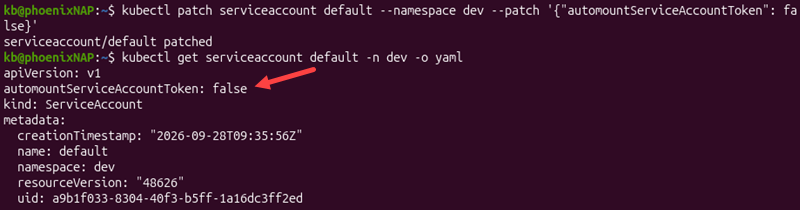
Alternatively, apply these settings per pod:
apiVersion: v1
kind: Pod
metadata:
  name: web
  namespace: dev
spec:
  automountServiceAccountToken: false
  containers:
  - name: web
    image: nginx:1.27
The pod-level setting takes precedence over the ServiceAccount setting. Workloads that use API access should use a dedicated ServiceAccount with a minimal role, and set automountServiceAccountToken: true on those pods.
Eliminating the Overuse of cluster-admin and system:masters
Give the cluster-admin role only to a few accounts, not teams or CI pipelines.
The system:masters group is even more dangerous. Members of that group bypass every RBAC check. Removing a RoleBinding or ClusterRoleBinding cannot revoke that access. A client certificate whose organization field is system:masters maps to this group.
Avoid issuing certificates that authenticate users as system:masters. Protect existing emergency administrative credentials and keep them offline when not in use.
Mapping Enterprise Identity Providers (OIDC / LDAP) Correctly
Kubernetes does not store users, so RBAC subjects should match the names and groups the authenticator produces. Connect the API server to an OIDC provider, and bind roles to groups. Prefixes avoid collisions between built-in identities and external names.
Note: Managed distributions such as Rancher configure authentication through their own settings.
Conducting Regular Audits and Permission Drift Scans
Grants become stale over time. Review permissions on a regular schedule. Start by checking current bindings:
kubectl get rolebindings,clusterrolebindings --all-namespaces \
-o custom-columns='NAMESPACE:.metadata.namespace,NAME:.metadata.name,ROLE:.roleRef.name,SUBJECTS:.subjects[*].name'
Third-party tools, such as rbac-tool and KubiScan, can also help perform more specific scans.
Enable API server audit logging to record any RBAC changes and Secret access. Point the API server at a policy file and a log location.
An example policy can look like the following:
apiVersion: audit.k8s.io/v1
kind: Policy
rules:
- level: RequestResponse
  resources:
  - group: "rbac.authorization.k8s.io"
    resources: ["roles", "rolebindings", "clusterroles", "clusterrolebindings"]
- level: Metadata
  resources:
  - group: ""
    resources: ["secrets"]
The policy logs request and response details for RBAC resources and metadata for Secret requests.
Note: RequestResponse is verbose. Design audit policies carefully to avoid excessive log volume and accidental exposure of sensitive data.
Isolating Multi-Tenant Namespaces with Combined RBAC and Network Policies
In multi-tenant namespaces, use policies to control traffic flow between pods. For example, start with a policy that denies all incoming traffic, then allow traffic within the namespace:
apiVersion: networking.k8s.io/v1
kind: NetworkPolicy
metadata:
  name: default-deny
  namespace: tenant-1
spec:
  podSelector: {}
  policyTypes:
  - Ingress
---
apiVersion: networking.k8s.io/v1
kind: NetworkPolicy
metadata:
  name: allow-same-namespace
  namespace: tenant-1
spec:
  podSelector: {}
  policyTypes:
  - Ingress
  ingress:
  - from:
    - podSelector: {}
Network policies work if the cluster's network plugin enforces them. Tenants should not have write access to network policies, or else they can remove the isolation.
Enforce Pod Security on the namespace too:
kubectl label namespace tenant-1 pod-security.kubernetes.io/enforce=baseline
For tighter control, use the restricted level instead.
Treating RBAC Manifests as Version-Controlled Code
Store roles and bindings in Git and adjust them through pull requests. This way, every change has an author, reviewer, and traceable history.
Policy engines can also reject roles that use wildcards, escalate, bind, and impersonate verbs.
Kubernetes RBAC Issues & Troubleshooting
Most RBAC issues return a Forbidden error that names the user, verb, resource, and namespace. Start by reading that message to confirm the identity involved, then check whether the person should have the permission at all.
The sections below cover some common cases.
User Cannot [verb] Resource in Namespace: Authorization Errors
A missing permission produces a descriptive error. The message typically contains the user, verb, resources, API group, and namespace. Use these to help identify the missing permission.
Common error causes include:
- Wrong identity. The current context authenticates as a different user than expected.
- Missing binding. No binding references to the user or group the user belongs to.
- Namespace mismatch. The RoleBinding exists in the wrong namespace.
- API group or resource mismatch. Deployments belong to the
appsgroup, not the core group. - Missing subresource. A pod rule doesn't cover the requested subresource.
- Case or prefix mismatch. Subject names are case-sensitive, and OIDC prefixes such as
oidc:must match the identity produced by the authenticator.
Confirm which identity kubectl uses:
kubectl auth whoamiThe command shows the username and groups of the current context.
Test the specific permission with:
kubectl auth can-i [verb] [resource] --namespace [namespace] --as [user]Search for bindings that mention the subject using:
kubectl get rolebindings,clusterrolebindings --all-namespaces -o wide | grep [user]
The output shows whether any bindings reference the specified user.
ServiceAccount Permission Denied Inside Pods
A pod that calls the API with missing or wrong permissions logs an error. The username in the error identifies the ServiceAccount the pod used to attempt the call. Check it against the one intended:
kubectl get pod [pod] --namespace [namespace] -o jsonpath='{.spec.serviceAccountName}'If the output shows default, the pod never referenced the intended ServiceAccount. Set spec.serviceAccountName in the pod or Deployment template. If the error shows system:anonymous, the request was not authenticated. Check whether the Pod has a ServiceAccount token mounted and whether the client is sending it correctly. Enable automountServiceAccountToken, then verify the ServiceAccount's permissions:
kubectl auth can-i list pods --namespace dev --as system:serviceaccount:dev:app
A result that shows no means the binding is missing or its subject is incorrect. Confirm that the binding's ServiceAccount subject includes the correct namespace. Role adjustments take effect without restarting the pod.
Privilege Escalation Blocked During Binding Creation
Kubernetes rejects a role or binding when the creator does not hold every permission the role/binding grants. The API enforces this rule, even when the RBAC authorizer is not active.
A user can create or update a role only if they hold all of its permissions at the same scope, or have the escalate verb on the role. The same principle applies to bindings: the user must hold all of the referenced role's permissions, or hold the bind verb on that role.
The safest way to fix the error is to allow someone with the required permissions to create the object. When a team requires creating bindings, grant bind on specific roles only. For example:
apiVersion: rbac.authorization.k8s.io/v1
kind: ClusterRole
metadata:
  name: edit-binder
rules:
- apiGroups: ["rbac.authorization.k8s.io"]
  resources: ["rolebindings"]
  verbs: ["create"]
- apiGroups: ["rbac.authorization.k8s.io"]
  resources: ["clusterroles"]
  verbs: ["bind"]
  resourceNames: ["edit"]
Bind the role with a RoleBinding so the permission stays inside a single namespace. Holders can then bind the edit role inside it and nothing else. This approach is safer than granting escalate.
Scope Mismatches (Binding ClusterRoles via RoleBindings vs. ClusterRoleBindings)
Building a ClusterRole with RoleBinding limits it to the binding's namespace. A ClusterRoleBinding applies it everywhere. Confusing the two creates either too much access or missing access.
Inspect the binding type and namespace of an existing object with:
kubectl get rolebinding [name] --namespace [namespace] -o yamlThe kind, metadata.namespace, and roleRef fields show the binding, type, scope, and referenced role. To narrow an over-broad grant, remove the ClusterRoleBinding. Instead, create RoleBinding objects for the namespaces that require access.
Orphaned Bindings and Stale Subject References
Kubernetes doesn't check whether a binding's subject exists. Deleting a ServiceAccount leaves its binding in place, and recreating a ServiceAccount with the same name and namespace automatically restores the old permissions.
User and group subjects are plain strings, so a binding for an offboarded employee stays active in the cluster until removed.
Review user and group subjects against the identity provider at the same time, and remove subjects that no longer belong to anyone.
Conclusion
This guide explained how Kubernetes RBAC works, including best practices and troubleshooting tips. It also explained how RBAC relates to real infrastructure and Rancher.
Next, learn more about Kubernetes tools.