Frequent releases are the core promise of DevOps, but manually building and maintaining environments slow down delivery. The same codebase can pass tests on one machine and fail in staging because of a different library version or configuration setting, and setting up new test environments requires procuring, installing, and configuring hardware.
DevOps virtualization addresses both problems by separating environments from physical hardware. Virtual environments are created from the same definition each time and provisioned on demand, reducing delays in the DevOps pipeline.
This article explains how virtualization supports DevOps practices, which virtualization types and tools are involved, and how to choose between virtual machines, containers, and bare metal.
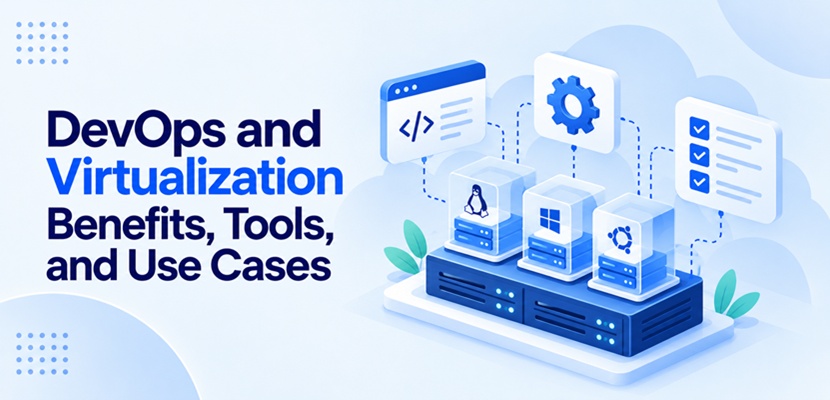
How Virtualization Supports the DevOps Lifecycle
In its most common form, virtualization uses software called a hypervisor to divide one physical machine's hardware resources into isolated virtual machines (VMs). Each VM runs its own operating system (OS) and behaves like a separate computer, even though it shares the underlying hardware with other VMs.
Because a VM is defined in software, it can be copied, versioned, and recreated from an image (a saved template that contains an OS, installed software, and settings). As a result, VMs fit the automated, repeatable workflows of DevOps at almost every stage of the lifecycle:
- Coding. Developers work inside VMs that match the production environment, so local results reflect what runs later.
- Building. The pipeline runs each build on a freshly created VM, so leftover files and settings from one build do not affect the next.
- Testing. Each automated test run gets a fresh environment that is created on demand and deleted once the results are in.
- Releasing. Staging environments are cloned from the same images as production, giving each release candidate a matching setup for validation.
- Deploying. Automation tools roll out new VM images or update existing VMs across environments.
- Operating. Operators move VMs between hosts, resize them, and track resource usage without accessing the physical hardware.
Operators feed production monitoring data back into the next round of coding. Each iteration starts again from the same images, so environments remain aligned from the first commit to production.
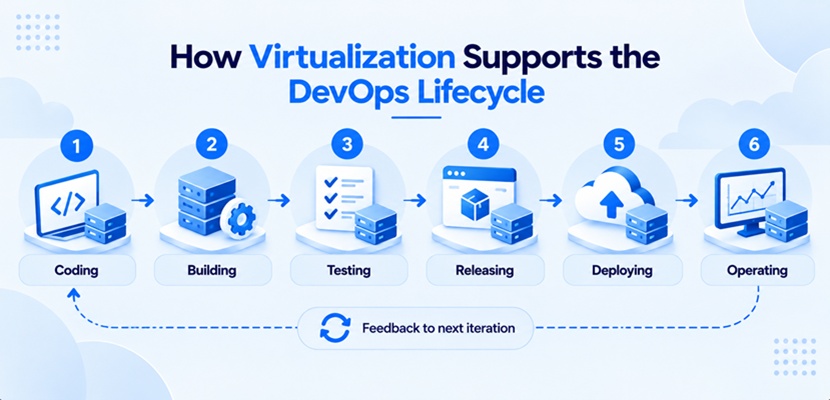
Key Benefits of Combining DevOps and Virtualization
Once environments become software objects that are created, copied, and retired on demand, several parts of the delivery process improve. Organizations that rely on automation and frequent change gain the most from this approach.
Environment Consistency
Each environment built from the same VM image starts with an identical baseline. The image defines the parts of an environment that most often cause environment-specific bugs:
- Operating system version.
- Installed packages and libraries.
- Configuration files and environment variables.
- Security settings.
When the image definition is stored in a Git repository or another version control system, any environment, including one from an older release, can be rebuilt from the same source and reviewed like application source code.
Faster Provisioning
Provisioning a physical server may require purchasing, installing, and configuring before it can host workloads, while a VM is created through a script or an API call. Automated server provisioning allows DevOps pipelines to create environments on demand without waiting for dedicated hardware to be prepared.
Better Hardware Utilization
A dedicated server that runs a single application often uses only a small part of its capacity. Virtualization consolidates many workloads onto fewer hosts, reducing server costs such as hardware purchases, rack space, and energy. Short-lived build and test environments release their resources as soon as a job ends, so the same hardware serves the next job.
Cloud computing is based on this consolidation model, with providers running VMs for many customers on shared physical servers.
Isolation and a Smaller Blast Radius
Each VM runs its own OS and kernel, separated from other VMs by the hypervisor. A failure or security breach in one VM typically remains contained within that VM, limiting the blast radius (the range of systems a single failure affects). This isolation allows engineers to test high-risk changes without affecting shared environments.
Fast Rollback and Recovery
Snapshots capture the state of a VM's disks (and optionally its memory) at a specific moment. If an update breaks an environment, operators restore the snapshot instead of rebuilding the system manually. Snapshots do not replace backups, but they reduce recovery time after failed changes.
Common Use Cases for DevOps and Virtualization
Any DevOps workflow that needs a temporary, isolated environment, or one that differs from a developer's own machine, can benefit from virtualization. Some scenarios depend on VMs entirely, while others combine them with containers or physical hardware. Common use cases include:
- Ephemeral CI/CD runners. A CI/CD pipeline creates a fresh VM to act as the runner (the machine that executes a job) for each build or test job and deletes it afterward. This way, no data or settings persist between jobs.
- Cross-platform testing. One build is tested on several operating systems, OS versions, or browser setups simultaneously, each in its own VM.
- Production-like staging. Before going live, each software release is validated in a staging environment cloned from production images, along with database migrations and infrastructure changes.
- Legacy application support. Legacy applications that cannot run in containers remain in VMs while still passing through the same automated build and deployment pipeline.
- Security testing and sandboxing. Penetration tests, untrusted third-party code, and malware analysis run in isolated VMs that act as sandboxes and are discarded afterward.
- Disaster recovery rehearsals. VM replicas start in a separate location, such as a secondary data center or a cloud disaster recovery environment, to test disaster recovery procedures without disrupting production.
- Self-service development labs. Developers create and remove personal VMs from approved templates, or work on virtual desktops delivered through virtual desktop infrastructure (VDI), instead of filing infrastructure requests.
Several of these use cases are often combined. A single pipeline might build on ephemeral runners, test across platforms, and promote the release through a staging copy of production.
Types of Virtualization Used in DevOps
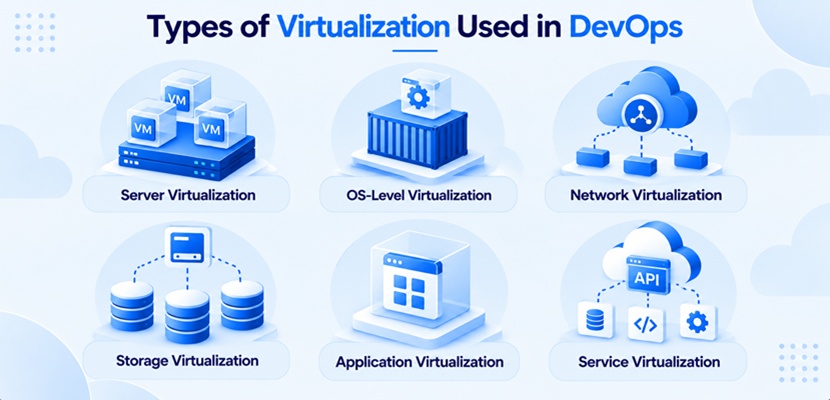
Abstraction (presenting a resource independently of the physical hardware that provides it) is the basis of virtualization and applies to more than servers. Networks, storage, and even external services can be virtualized, and DevOps workflows rely on several of these layers at the same time:
- Server virtualization. A hypervisor splits one physical server into multiple VMs, each with its own OS. Some setups use paravirtualization, where a modified guest OS communicates directly with the hypervisor to reduce overhead.
- OS-level virtualization. Containers share the host OS kernel and isolate applications at the process level instead of virtualizing hardware.
- Network virtualization. Software defines networks and their subnets, along with firewall rules, so each environment gets its own isolated network without new physical equipment.
- Storage virtualization. Disks from multiple devices are pooled into logical volumes that VMs and containers use without depending on specific hardware.
- Application virtualization. Applications are packaged with their dependencies and run in an isolated layer above the OS, without a traditional installation.
- Service virtualization. Simulated versions of APIs, databases, or third-party services (e.g., a payment gateway) respond like the real systems, so testing can start before a dependency is available.
Server virtualization and OS-level virtualization support most DevOps workloads, and the choice between them affects how a pipeline is designed.
Containers vs. Virtual Machines for DevOps
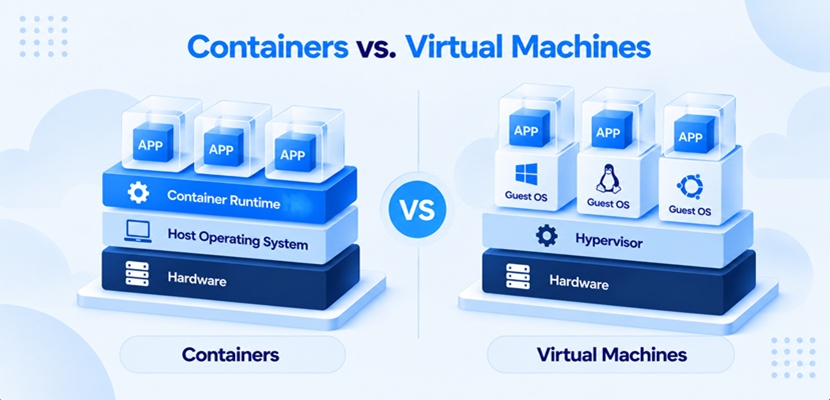
Virtual machines virtualize hardware, while containers virtualize the operating system. A VM includes a full guest OS on top of a hypervisor, giving it strong isolation and the ability to run any OS. A container packages only the application and its dependencies and runs through a container runtime (the software that starts and manages containers) on the host OS, making it smaller and faster to start.
The two architectures have different strengths in a DevOps pipeline:
| Criterion | Virtual Machines | Containers |
| Isolation | Strong isolation at the hardware level through the hypervisor. | Process-level isolation on a shared kernel. |
| Startup Time | Slower, because a full OS boots. | Fast, because no OS boots. |
| Image Size | Large, since each image includes a full OS. | Small, since each image holds only the application and its dependencies. |
| Operating System | Any OS, independent of the host. | The same kernel as the host (e.g., Linux containers on a Linux host). |
| Typical DevOps Role | Full environments, legacy applications, and workloads that need strong isolation. | Continuous integration (CI) jobs, microservices, and applications that scale quickly. |
In practice, the two technologies work together. Many Kubernetes clusters run on VMs, combining the isolation of a VM with the portability of a container. The technologies are also becoming more closely integrated. MicroVMs (lightweight VMs built to start quickly) reduce the performance gap between VMs and containers, while tools such as KubeVirt allow Kubernetes to manage VMs alongside containers.
DevOps and Virtualization Tools
A virtualized DevOps infrastructure combines tools that run VMs with tools that define, build, and manage them. Organizations typically choose one option per category and connect the tools through the pipeline. The main categories are:
- Hypervisors and virtualization platforms. Kernel-based Virtual Machine (KVM) is built into the Linux kernel; VMware ESXi is a standalone hypervisor installed directly on server hardware; and Microsoft Hyper-V ships with Windows. Each of these hypervisors runs VMs directly on physical hosts. Proxmox VE is an open-source management platform built on KVM.
- Image and environment builders. Packer creates identical VM images for several platforms from one template, while Vagrant sets up reproducible VM-based development environments on desktop hypervisors such as VirtualBox.
- Infrastructure as code (IaC) and configuration management. Tools such as Terraform and OpenTofu (an open-source fork of Terraform) provision VMs and networks from code, while Ansible configures the software inside them.
- Containers and container orchestration. Tools such as Docker and its alternative Podman build, run, and manage containers, while Kubernetes schedules them across clusters. Extensions such as KubeVirt also enable Kubernetes to manage VM workloads.
The best DevOps tools for a given setup depend on existing skills and infrastructure as much as on features. Open-source options exist in every category, so a complete virtualized pipeline does not require commercial licenses.
Challenges of Virtualization in DevOps
Placing a software layer between hardware and workloads adds management tasks of its own. Most problems appear as environments multiply and automated workflows create resources faster than they are tracked.
VM Sprawl
Because a VM is easy to create, unused VMs accumulate over time. Forgotten test environments, abandoned experiments, and duplicate copies continue to consume processing power, storage, and licenses. Inventory and cost reports also become unreliable when it is unclear which VMs are still needed.
Image and Configuration Drift
VMs built from the same image can diverge over time when operators patch or reconfigure them manually (configuration drift). As a result, staging environments no longer match production, and the consistency gained from virtualization is lost. Outdated golden images (approved base templates for new VMs) introduce a related risk, as newly provisioned VMs may start with outdated software, missing security patches, and known vulnerabilities.
Security of the Virtualization Layer
The hypervisor and its management console control all VMs on a host, making them a high-value target. A weakness at this layer can expose all the workloads above it, not just one application. Common risk areas include:
- Unpatched hypervisors and management consoles.
- Overly broad administrator access to the virtualization platform.
- Flat virtual networks that allow lateral movement between VMs.
- VM images with hardcoded credentials or outdated software.
Each of these risks increases the attack surface of the whole environment. Security virtualization uses software-based protections, such as different types of firewalls, to control traffic and isolate workloads. Teams following DevSecOps practices also build security checks for virtualized infrastructure throughout the development and deployment pipeline.
Licensing and Platform Costs
Commercial virtualization platforms charge per host, per processor core, or per subscription bundle, and vendors change these models over time. After recent licensing changes from major vendors, many organizations have reassessed their platform or moved workloads to open-source hypervisors and other VMware ESXi alternatives. Migrating VMs between platforms requires planning, testing, and maintenance windows, so the choice of hypervisor has long-term cost consequences.
Skills and Operational Complexity
Running a virtualized environment requires knowledge of hypervisors, virtual networking, and automation tools. Because DevOps roles combine development and operations duties, developers who work mainly with containers may need to learn VM management, while operations staff may need to learn infrastructure as code.
Addressing this skills gap requires training or new hires, and following a structured DevOps roadmap helps engineers decide which skills to build first. Without that investment, environments tend to be managed inconsistently.
Virtualization vs. Bare Metal for DevOps: How to Choose
On bare metal, workloads run directly on physical hardware, with no hypervisor between the OS and the processor, memory, and storage. Virtualization provides flexibility and high workload density, while bare metal provides direct access to the full, predictable performance of the hardware. The choice between bare metal and virtualization depends on what each workload needs from the infrastructure:
| Criterion | Virtualization | Bare Metal |
| Environment Lifespan | Short-lived environments that are created and removed many times a day. | Long-running workloads with stable resource needs. |
| Workload Type | Many small workloads that share hardware efficiently. | Performance-sensitive workloads, such as databases, big data processing, or AI model training. |
| Performance | Shared host resources that the hypervisor allocates between VMs. | Full, consistent performance with no hypervisor overhead and no competing VMs on the same host (the noisy neighbor problem). |
| Hardware Access | Virtual hardware presented by the hypervisor. | Direct access to hardware such as GPUs and specific processor features. |
| Operating Systems | Multiple operating systems on the same host. | One OS with full control of the server. |
| Tenancy | Hosts that can be shared by many workloads. | Single-tenant hardware for compliance or security requirements. |
| Workflow Features | Snapshots, live migration (moving a running VM between hosts), and fast cloning. | API-driven provisioning and IaC integrations on bare metal cloud platforms. |
The two options are not mutually exclusive. Some organizations run Kubernetes on bare metal to avoid the hypervisor layer, while others install their own hypervisor on dedicated hardware to keep full control of the virtualization stack. Bare metal also no longer requires manual provisioning, since a bare metal cloud provisions physical servers through an API with the same automation tools used for VMs.
Note: phoenixNAP's Bare Metal Cloud is a dedicated server with the flexibility of the cloud. Single-tenant hardware is provisioned and released through the BMC API or IaC integrations with tools such as Terraform, Pulumi, and Ansible, so performance-sensitive workloads run in the same automated pipeline as virtualized environments.
Best Practices for DevOps and Virtualization
Treating VMs as disposable, code-defined resources applies core DevOps principles, such as automation and repeatability, to infrastructure. VMs that are maintained manually over long periods tend to drift from their original configuration and from each other. Organizations keep virtualized environments consistent, secure, and cost-efficient with the following practices:
- Define VMs and images as code. Store templates, VM definitions, and configuration in version control. Change them only through reviewed commits.
- Rebuild instead of patching in place. Update the golden image. Replace running VMs with new ones built from it.
- Make test environments ephemeral. Create environments per branch or per pipeline run. Delete them automatically when the job finishes.
- Tag and limit resources. Apply owner and expiration tags to detect unused VMs. Set quotas to limit the resources each project can use.
- Harden the virtualization layer. Patch hypervisors on a schedule. Apply the principle of least privilege to administrator accounts through role-based access control (RBAC). Use network segmentation to separate environments.
- Match each workload to the right platform. Run microservices in containers, full environments in VMs, and performance-sensitive workloads on bare metal.
- Monitor hosts and guests together. Track resource usage on physical hosts and inside VMs to detect early signs of resource contention and overcommitment (allocating more virtual CPUs or memory than the host physically has).
Most of these practices depend on infrastructure automation. The more of the environment lifecycle a pipeline automates, from image builds to cleanup, the fewer manual changes there are to drift, fail, or go unnoticed.
DevOps and Virtualization FAQ
Containers and cloud-native architecture are newer than virtualization, which has been part of software delivery for decades. This overlap, along with other DevOps trends, raises recurring questions about how the technologies relate and whether virtualization is still required in a modern DevOps setup.
How Does Virtualization Help DevOps?
Virtualization turns environments into software that is built from images, provisioned on demand, and deleted when no longer needed. DevOps pipelines gain consistent environments from development to production, faster provisioning, and quick rollback through snapshots.
Are Containers Replacing Virtual Machines in DevOps?
No. Containers have replaced VMs for many application workloads, especially microservices, but many container platforms still run on VMs. VMs remain the standard for strong isolation, legacy applications, and workloads that need a different OS than the host.
Do You Need Virtualization for DevOps?
No. DevOps is a set of practices, not a specific technology. Virtualization makes environments easier to automate and reproduce, but containers on bare metal or API-provisioned dedicated hardware support the same automated workflows.
Making DevOps and Virtualization Work Together
Virtualization gives DevOps workflows identical, disposable environments created on demand, and it works alongside containers and bare metal instead of being replaced by them. The best results come from matching each workload to the right platform and defining each environment as code. Start by converting one manually maintained test environment into a versioned VM image and rebuilding it through your pipeline.