


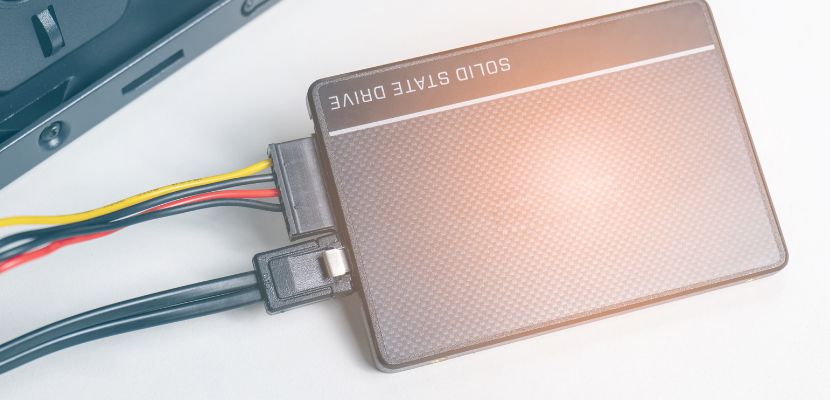
Serial Advanced Technology Attachment (SATA) is a widely used interface for connecting storage devices, such as hard disk drives (HDDs) and solid-state drives (SSDs), to a computer system.
What Is Meant by Serial Advanced Technology Attachment (SATA)?
Serial Advanced Technology Attachment (SATA) is a hardware interface and communication standard that governs how storage devices connect to and exchange data with a computer system. It uses a serial communication method, meaning data is transmitted one bit at a time over a dedicated connection, which improves signal integrity and allows for higher data transfer speeds compared to older parallel interfaces.
SATA defines both the physical components, such as cables, connectors, and electrical signaling, and the protocols that control how data is packaged, transmitted, and received between the host system and the storage device.
SATA Key Features
SATA includes several built-in features that improve data transfer efficiency, simplify hardware connections, and enhance overall storage performance. These features make it a practical and widely adopted interface for connecting storage devices across different types of systems:
- Serial data transfer. SATA transmits data one bit at a time over a dedicated channel, which reduces signal interference and enables higher, more stable data transfer speeds compared to parallel interfaces.
- High data transfer rates. SATA has evolved through multiple versions (e.g., SATA I, II, III), with each generation increasing maximum throughput, allowing faster read and write operations for connected drives.
- Hot swapping (hot plugging). SATA supports connecting or disconnecting storage devices while the system is powered on, provided the hardware and operating system support this feature.
- Native Command Queuing (NCQ). NCQ allows the storage device to reorder incoming data requests to optimize read/write operations, reducing latency and improving performance under heavy workloads.
- Thin and flexible cables. SATA uses compact, lightweight cables that improve airflow inside the system and simplify cable management compared to older, bulkier connectors.
- Point-to-point connection. Each SATA device connects directly to the motherboard or controller through its own dedicated port, eliminating the need for master/slave configurations and reducing contention between devices.
- Backward compatibility. Newer SATA devices and controllers are designed to work with older versions of the standard, ensuring broad compatibility across different generations of hardware.
How Does SATA Work?
SATA works by creating a direct communication link between the motherboard or storage controller and a storage device such as an HDD, SSD, or optical drive. It defines how the device is physically connected and how data moves back and forth so the system can store, retrieve, and manage information efficiently. Here is exactly how it works:
- The system establishes a physical connection. A SATA data cable connects the storage device to the motherboard or controller, while a separate power cable supplies electricity to the device. This creates the hardware path needed for communication.
- The controller detects the connected device. When the system starts, the SATA controller checks its ports for attached drives. Once it identifies a device, it prepares the connection so the operating system can recognize and use it.
- The operating system initializes the drive. After detection, the operating system loads the necessary drivers and communicates with the drive through the SATA controller. This makes the device available for reading, writing, and file management.
- The system sends a read or write request. When a user opens, saves, or copies data, the operating system sends an instruction through the controller to the SATA device. This tells the drive what data to retrieve or where new data should be stored.
- Data moves through the serial connection. The drive transfers data one bit at a time over the SATA interface. This serial method improves signal reliability and allows data to move efficiently between the device and the rest of the system.
- The drive processes the request. The storage device reads the requested data or writes new data to its storage media. Features such as NCQ may improve this process by organizing requests in a more efficient order.
- The system receives and uses the data. Once the transfer is complete, the data is delivered to the operating system or stored on the drive. This allows applications to load files, save changes, or continue other tasks without directly managing the hardware details.
SATA Versions and Speeds
SATA has evolved through several versions, with each revision increasing the maximum data transfer rate while maintaining backward compatibility. The table below outlines the key differences between major SATA versions and their supported speeds:
| SATA version | Release year | Maximum transfer rate (Gbps) | Approx. throughput (MB/s) | Common name | Notes |
| SATA I | 2003 | 1.5 Gbps | ~150 MB/s | SATA 1.5 Gb/s | First generation; replaced Parallel ATA (PATA) and introduced serial communication. |
| SATA II | 2004 | 3.0 Gbps | ~300 MB/s | SATA 3 Gb/s | Doubled bandwidth; introduced features like Native Command Queuing (NCQ). |
| SATA III | 2009 | 6.0 Gbps | ~600 MB/s | SATA 6 Gb/s | Current standard; supports modern SSD speeds and improved power management. |
SATA Cables
SATA cables are used to connect storage devices to the motherboard or storage controller and to supply power to those devices. The standard defines two main cable types, each with specific characteristics: data cables for communication and power cables for delivering electricity.
| Cable type | Connector type | Pin count | Function | Typical use | Key characteristics |
| SATA Data Cable | 7-pin (L-shaped). | 7 pins | Transfers data between the storage device and motherboard/controller. | Connects HDDs, SSDs, and optical drives to SATA ports. | Thin and flexible; supports high-speed serial data transfer; limited length (typically up to 1 meter); often includes locking clips for secure connection. |
| SATA Power Cable | 15-pin (L-shaped). | 15 pins | Supplies power from the power supply unit (PSU) to the storage device. | Powers HDDs, SSDs, and optical drives. | Provides multiple voltage levels (3.3V, 5V, 12V); wider connector; designed to support hot swapping and stable power delivery. |
| eSATA Cable | Shielded external SATA. | 7 pins | Transfers data between external storage devices and the system. | External drives and enclosures. | More durable and shielded than internal cables; supports longer distances (up to ~2 meters); does not carry power (separate power source required). |
What Is SATA Used For?
Serial Advanced Technology Attachment is used to connect and manage storage devices within a computer system. It provides a reliable and standardized way for systems to store, retrieve, and transfer data across a wide range of use cases, including:
- Connecting internal storage devices. SATA is primarily used to link hard disk drives (HDDs), solid-state drives (SSDs), and optical drives to the motherboard, enabling the system to access stored data.
- Data storage and retrieval. It allows operating systems and applications to read and write data on storage devices, supporting everyday tasks such as booting the system, saving files, and running software.
- Expanding storage capacity. Additional SATA ports make it possible to add more drives, allowing users to increase total storage without replacing existing hardware.
- Supporting external storage (via eSATA). SATA can also be used for external connections through eSATA, enabling high-speed data transfer between the system and external drives or storage enclosures.
- Enabling backup and data archiving. SATA-connected drives are commonly used for backups and long-term data storage, helping protect important data and support recovery processes.
- Powering optical media operations. SATA connects optical drives such as DVD or Blu-ray drives, allowing systems to read and write data on physical media.
- Providing cost-effective storage solutions. SATA is widely adopted due to its affordability and compatibility, making it a practical choice for both personal computers and enterprise storage systems.
Advantages and Limitations of SATA
SATA offers a balance of performance, simplicity, and cost, making it a common choice for connecting storage devices. However, like any technology, it comes with both strengths and limitations that affect its suitability for different use cases.
What Are the Advantages of SATA?
SATA provides a practical and widely supported interface for connecting storage devices, offering a balance of performance, simplicity, and cost. Its design makes it suitable for everyday computing as well as many enterprise use cases. The main advantages include:
- Wide compatibility. SATA is supported by most motherboards and storage devices, making it easy to integrate across different systems and hardware generations.
- Cost-effectiveness. SATA drives and components are generally more affordable than newer high-speed alternatives, making them a budget-friendly option for large-capacity storage.
- Simple installation and configuration. The interface uses straightforward connectors and does not require complex setup, allowing quick deployment and easy upgrades.
- Improved airflow and cable management. Thin, flexible cables reduce clutter inside the system, which helps maintain better airflow and cooling compared to older interfaces.
- Reliable performance for general use. SATA provides sufficient speed for typical workloads such as operating systems, file storage, and standard applications.
- Hot swapping support. With compatible hardware and software, SATA allows drives to be connected or removed without shutting down the system, improving maintenance flexibility.
- Backward compatibility. Newer SATA versions work with older devices and controllers, ensuring long-term usability and easier hardware transitions.
What Are the Disadvantages of SATA?
While SATA is widely used and reliable, it has limitations that can affect performance and scalability in more demanding environments. These drawbacks are especially noticeable when compared to newer storage interfaces:
- Limited data transfer speeds. Even the latest SATA III standard is capped at 6 Gbps (~600 MB/s), which is significantly slower than interfaces like NVMe that use PCIe and offer much higher throughput.
- Higher latency compared to modern interfaces. SATA was not designed for low-latency, high-parallel workloads, which can result in slower response times, especially for SSDs.
- Not optimized for high-performance SSDs. SATA can become a bottleneck for modern solid-state drives, preventing them from reaching their full performance potential.
- Limited scalability. Each SATA device requires a dedicated port, which can restrict the number of drives that can be connected without additional controllers or expansion cards.
- Cable management at scale. Although individual cables are small, systems with many drives can become cluttered due to the need for separate data and power cables for each device.
- Reduced efficiency for enterprise workloads. SATA lacks advanced features and parallelism needed for high-performance computing, large-scale databases, or real-time analytics environments.
- Declining relevance in modern systems. Many newer systems are shifting toward NVMe and PCIe-based storage, reducing the role of SATA in performance-critical applications.
SATA FAQ
Here are the answers to the most commonly asked questions about SATA.
Is Serial ATA the Same as SATA?
Yes, Serial ATA and SATA refer to the same technology. “Serial ATA” is the full name of the standard, while “SATA” is its commonly used abbreviation. Both terms describe the interface used to connect storage devices, such as hard drives and solid-state drives, to a computer system using serial data transfer. In practice, the shorter term SATA is used almost exclusively in documentation, product specifications, and everyday discussions, but it carries the same meaning as Serial ATA.
Which Is Better, an SDD or Serial ATA Drive?
An SSD and a SATA drive are not directly comparable because they refer to different aspects of storage. An SSD is a type of storage device, while SATA is an interface used to connect storage devices to a computer.
If the comparison is between an SSD and a traditional SATA hard disk drive, then an SSD is generally better. SSDs use flash memory instead of spinning disks, which makes them significantly faster, more durable, and more energy-efficient. They provide quicker boot times, faster file access, and better overall system responsiveness.
However, if the comparison is between a SATA SSD and other types of SSDs (such as NVMe SSDs), then SATA SSDs are slower because they are limited by the SATA interface. NVMe SSDs use the PCIe interface and can deliver much higher speeds and lower latency.
In practice, SSDs are the better choice for performance, while SATA (especially with HDDs) remains a cost-effective option for bulk storage.
Is SATA Still Used Today?
Yes, SATA is still widely used today, especially for general-purpose and high-capacity storage. While newer interfaces like NVMe offer significantly higher speeds, SATA remains a practical choice due to its affordability, compatibility, and reliability.
SATA is commonly used for hard disk drives in desktops, servers, and storage systems where large amounts of data need to be stored cost-effectively. It is also used for SATA-based SSDs, which still provide solid performance for everyday tasks such as operating systems, applications, and backups, even if they are slower than NVMe drives.
In modern systems, SATA is often used alongside newer technologies rather than being replaced entirely. NVMe handles performance-critical workloads, while SATA supports bulk storage, backups, and less demanding applications.
