Traditional applications often struggle with traffic spikes or take long to update, because every part of the code is bundled into a single application that is built, tested, and deployed as one unit. Cloud-native architecture addresses this problem by breaking an application into independent, containerized services that can be updated, deployed, and scaled separately.
Cloud-native architecture builds applications for cloud environments from the start, instead of adapting them later. The approach favors small, independently deployable services that developers can update without affecting the rest of the system.
This article explains what cloud-native architecture is, its core principles, and how it works.
What Is Cloud-Native Architecture?
Cloud-native architecture is an approach to designing and running applications specifically for public, private, or hybrid cloud environments, instead of adapting existing applications to run in the cloud. Applications built this way consist of independent services that can fail, update, or scale without affecting the rest of the system, and that expose enough data to monitor their performance in real time.
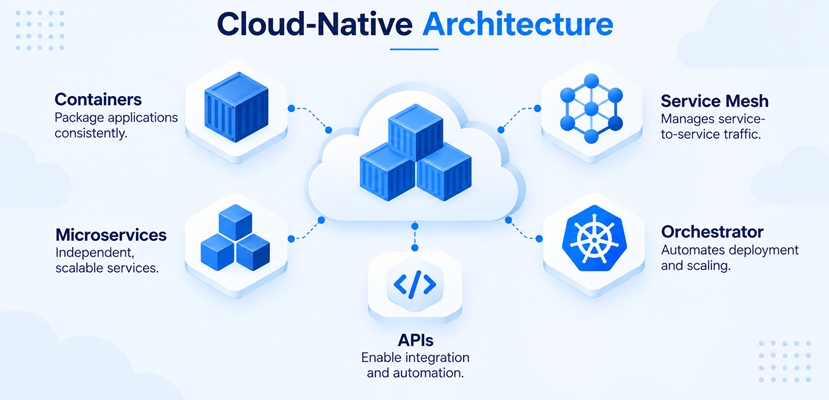
Cloud-native systems combine containers, service meshes, microservices, orchestration tools, and declarative APIs. Containers package application code consistently across environments, and service meshes manage the network traffic between them. Automated pipelines and container orchestration tools such as Kubernetes allow for frequent and fast recovery from failures.
Core Cloud-Native Architecture Principles
Cloud-native architecture rests on a set of design principles that guide how organizations build and run applications. Each principle addresses a specific weakness of traditional applications.
Applying them together produces an application that is resilient, scalable, and easy to update.
Self-Reliant Containers
Cloud-native applications package each service and its dependencies into a container, a lightweight, portable unit that runs consistently across environments.
Containers isolate services from one another, so a failure or update in one container does not affect the rest of the application. This isolation also lets developers deploy the same container across development, testing, and production environments without configuration drift.
Managed Services Designed for Interaction and Collaboration
Cloud-native systems can use managed IT services, such as databases, message queues, and identity providers, which handle a specific function and expose it through a well-defined API.
Services communicate over the network instead of sharing code or a database directly. This design lets developers swap or scale individual services without redesigning the entire application.
Stateless and Scalable Components
Cloud-native services are stateless whenever possible, meaning they do not store session data locally between requests. This makes horizontal scaling straightforward because any healthy instance can handle a request. The orchestration platform can then add or remove instances to match current demand without losing data or disrupting active sessions.
Applications that need to retain state store it in an external service, such as a managed database or cache, keeping the services themselves easy to scale.
Automated Processes and CI/CD Pipelines
Continuous integration and continuous delivery (CI/CD) pipelines automate the process of testing, building, and deploying code. Every code change moves through the same automated checks before reaching production, which reduces manual errors and shortens software release cycles.
Automation also extends to infrastructure itself through practices like infrastructure as code, where developers define environments in version-controlled configuration files.
Resilient Architecture
Cloud-native applications are designed to expect failure rather than avoid it. Techniques such as health checks, automatic restarts, circuit breakers, and redundant service instances let the system recover from individual component failures with minimal service disruption.
Cloud orchestration platforms monitor these components continuously and replace failed instances automatically.
Note: Containerized workloads still need reliable compute resources to run at scale. phoenixNAP Bare Metal Cloud (BMC) provides API-driven dedicated servers built for different orchestration platforms.
How Does Cloud-Native Architecture Work?
Cloud-native architecture puts its design principles into practice through a consistent set of steps, from writing code to running it in production.
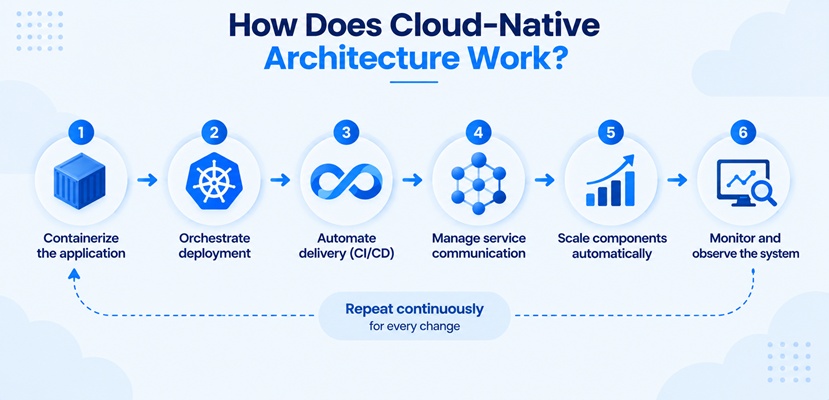
Each step below repeats for every code change:
- Containerizing the application. Developers package each service and its dependencies into a container image, so it runs the same way in any environment.
- Orchestrating deployment. A platform such as Kubernetes schedules containers across available servers, restarts failed instances, and distributes traffic between them.
- Automating delivery through CI/CD. A pipeline tests, builds, and deploys each code change automatically, moving it from the code repository to production without manual steps.
- Managing service communication. A service mesh handles the network traffic between services, adding encryption, retries, and traffic routing without changes to application code.
- Scaling components automatically. The orchestration platform adds or removes container instances based on real-time demand, keeping performance steady during traffic spikes.
- Monitoring and observing the system. Logging, metrics and KPIs, and tracing tools give teams visibility into how each service performs, so they can detect and resolve issues quickly.
These steps run continuously rather than once, since new code, traffic patterns, and failures move through the same automated pipeline repeatedly. This constant cycle is what separates cloud-native applications from traditional ones.
Cloud-Native vs. Traditional Architecture
Traditional architecture builds an application as a single, monolithic codebase. All functions, from the user interface to the database logic, run together, so a small change requires rebuilding and redeploying the entire application. When scaling, the whole application scales together, even when only one function needs more resources.
Cloud-native architecture breaks that same application into independent services that teams can update, deploy, and scale on their own. This structural difference affects how each architecture handles daily operations.
The differences between cloud-native and traditional architecture are shown in the table below:
| Aspect | Traditional Architecture | Cloud-Native Architecture |
|---|---|---|
| Structure | Monolithic, tightly coupled. | Microservices, loosely coupled. |
| Deployment | Manual, infrequent releases. | Automated, frequent releases through CI/CD. |
| Scaling | Scales the entire application. | Scales individual services independently. |
| Failure Handling | A single fault can affect the whole application. | Orchestration isolates and recovers from individual failures. |
These structural differences explain why cloud-native applications adapt faster to changing demand. But that adaptability comes from how the application is built, not from where it runs.
Cloud-Native vs. Cloud-Based Architecture
Cloud-based architecture describes an application that runs on cloud infrastructure. It can retain a traditional or monolithic structure or use some cloud-specific capabilities without adopting the broader principles of cloud-native architecture. Organizations can move existing applications to the cloud through a lift-and-shift migration, meaning they relocate it to cloud infrastructure with little or no change to its code or structure.
Cloud-native architecture rebuilds the application to take advantage of cloud environments from the start, using containers, microservices, and automated orchestration. A lift-and-shift application can gain cloud benefits such as on-demand infrastructure and infrastructure-level scaling, but a monolithic application still scales and deploys primarily as a single unit.
The following table shows the differences between these two architecture types:
| Aspect | Cloud-Based Architecture | Cloud-Native Architecture |
|---|---|---|
| Migration Approach | Lift-and-shift, minimal code changes. | Rebuilt or redesigned for the cloud. |
| Underlying Structure | Often remains monolithic. | Microservices-based by design. |
| Scalability | Scales the application as a whole. | Scales individual services on demand. |
| Portability | Tied to the original environment's assumptions. | Designed to improve portability across environments. |
These differences show why moving to clouds and being cloud-native are not the same thing. An application can run entirely on cloud infrastructure and still carry the same structural limits it had on premises.
Benefits of Cloud-Native Architecture
Cloud-native architecture's design principles translate directly into practical advantages for organizations that adopt this approach.
The main benefits of cloud-native architecture are:
- Faster time to market. Independent services ship on their own schedule, so a new feature doesn't wait for unrelated parts of the application to be ready.
- Independent scaling. Engineers scale only the services under load, which uses infrastructure more efficiently than scaling an entire monolithic application.
- Higher application availability. A failure stays contained to a single service, so customers see fewer full outages than they would with one monolithic application where a single bug can take everything down.
- Resource efficiency. Containers share the underlying operating system and use only the resources a service needs, reducing waste compared to full virtual machines.
- Portability. Containerized services run consistently across public, private, and hybrid cloud environments, which reduces vendor lock-in.
- Developer productivity. Independent services let separate teams build, test, and deploy their own components without waiting for other teams' release cycles.
These benefits compound over time. Faster releases and improved resilience reduce the engineering time spent on maintenance, which frees capacity for the development of new features.
Use Cases for Cloud-Native Architecture
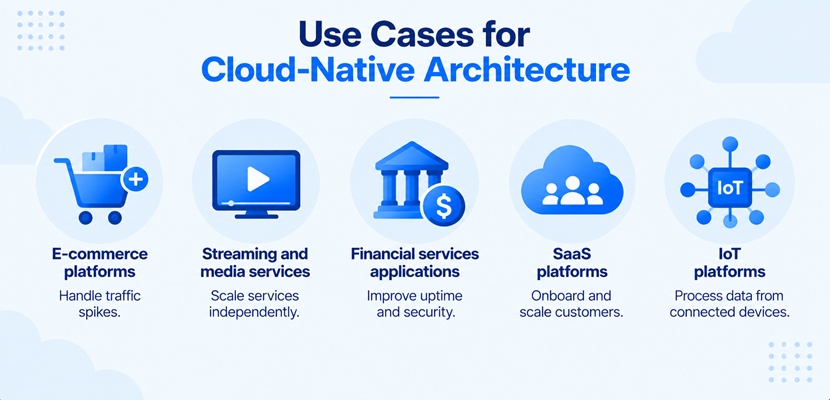
Cloud-native architecture fits workloads that experience variable demand, need frequent updates, or must stay available around the clock.
Common use cases include:
- E-commerce platforms. Independent scaling handles unpredictable traffic spikes during sales events without over-provisioning infrastructure year-round.
- Streaming and media services. Microservices let engineers scale encoding, recommendation, and playback functions separately based on real-time viewer demand.
- Financial services applications. Service isolation limits the impact of a single component failure, which supports the uptime and security requirements of payment and trading systems.
- SaaS platforms. Multi-tenant applications use independent services to onboard new customers and scale usage without redesigning the underlying application.
- IoT platforms. Event-driven microservices process data from large, fluctuating numbers of connected devices without a central bottleneck.
Key Technologies in the Cloud-Native Ecosystem
A specific set of tools makes cloud-native architecture possible in practice. Most organizations combine tools from several categories rather than building a stack around a single vendor.
The following technologies form the core of most cloud-native stacks:
- Container runtimes. Docker, containerd, and CRI-O package application code and dependencies into portable containers that run consistently across environments.
- Orchestration platforms. Kubernetes schedules containers across a cluster, restarts failed instances, and manages networking and storage between them.
- Service meshes. Tools such as Istio and Linkerd manage traffic, security, and communication between services without changes to application code.
- CI/CD tools. Platforms such as Jenkins, GitLab CI, and GitHub Actions automate testing, building, and deploying code changes.
- Observability tools. Prometheus, Grafana, and distributed tracing tools show how each service performs, helping teams pinpoint the source of an issue faster.
- Infrastructure as code tools. Terraform provisions and manages the underlying infrastructure a cloud-native application runs on, using version-controlled configuration files.
Few organizations adopt every category at once. Most start with container runtimes and orchestration, then add a service mesh, observability, and IaC tooling as the number of services grows and manual coordination stops scaling. The specific vendors matter less than compatibility: a team's orchestration platform, CI/CD tooling, and observability stack all need to work together, which is why most cloud-native stacks converge on a small set of interoperable, often open-source tools rather than a single vendor's full suite.
Challenges of Cloud-Native Architecture
Cloud-native architecture addresses specific limitations of traditional applications, but it also introduces operational and organizational challenges. These challenges surface as an application grows from a handful of services to dozens, once informal, ad hoc processes stop scaling.
Common challenges of cloud-native architecture are:
- Operational complexity. Running dozens or hundreds of independent services requires more coordination than managing a single monolithic application.
- Skills gap. Teams need expertise in containers, orchestration, automation, and distributed systems, which may require new skills or training.
- Expanded attack surface. Each service, API, and container is a potential entry point, which increases the number of components a security team must monitor.
- Cost visibility. Usage-based cloud costs across many independent services can make spending harder to track and predict than the infrastructure costs of a single application.
- Diagnostic difficulty. Tracing a single issue across many independent services takes more effort than debugging one monolithic codebase, unless organizations invest in centralized logging, metrics, and distributed tracing.
None of these challenges should rule out cloud-native architecture, but it does mean the decision depends heavily on how prepared an organization is to take it on.
When to Choose Cloud-Native Architecture
Cloud-native architecture fits organizations that are ready to invest in the operational practices it requires. The right choice depends on organizational readiness, workload characteristics, and operational requirements rather than company size or industry alone.
Consider cloud-native architecture when:
- Demand is variable or unpredictable. Independent, automated scaling reduces the cost of maintaining capacity for peak traffic year-round.
- Release speed matters. Automated pipelines let developers ship updates multiple times a day instead of on a fixed schedule.
- The team has, or can build, the required skills. Containers, orchestration, and automation require dedicated expertise to operate safely.
- Downtime carries a high cost. Built-in resilience and automated failover reduce the business impact of individual component failures.
A monolithic or cloud-based approach is more practical for smaller applications with stable, predictable traffic, or for teams without the resources to manage a distributed system.
Cloud-Native Architecture FAQ
Cloud-native architecture introduces new concepts and trade-offs that affect both technical design and migration planning. Evaluating this approach typically requires clarity on the underlying principles, whether an existing application can adopt them, and which tools the approach requires.
The following questions address the most common of these concerns.
What Are the Core Principles of Cloud-Native Architecture?
Cloud-native application architecture rests on five principles:
- Self-reliant containers.
- Managed services designed for interaction and collaboration.
- Stateless and scalable components.
- Automated CI/CD pipelines.
- Resilient architecture.
Together, these principles help applications scale independently, tolerate component failures, and support frequent, automated changes.
Can Legacy Applications Become Cloud-Native?
Legacy applications can become cloud native, but the process requires rearchitecting rather than just moving them to the cloud.
Teams first containerize existing components, then gradually replace pieces of the old application with new, independent services until the legacy system is fully decoupled. This incremental approach, sometimes called the strangler fig pattern, lets an organization modernize gradually instead of rebuilding everything at once.
Do You Need Kubernetes to Be Cloud-Native?
Kubernetes is not required to build a cloud-native application, though it has become the most widely used orchestration platform for doing so.
Managed container services, serverless platforms, and other orchestrators can also run containerized, independently scalable services. What makes an application cloud native is whether it follows the underlying principles, such as loose coupling and automated scaling, not which specific tool manages it.
Building Applications That Belong in the Cloud
Cloud-native architecture can improve scalability, resilience, and delivery speed when an application benefits from independently managed components and automated operations. It also introduces greater operational complexity, meaning the architecture is not the right fit for every workload.
Before choosing an approach, evaluate workload requirements, organizational capabilities, and operational priorities. For applications that need flexible scaling and frequent releases, cloud-native architecture can provide a strong foundation for growth.